Zero Trust Security Explained: Never Trust, Always Verify
Imagine you own a high-security office building. You have a strict security guard at the front door who checks everyone's ID before they enter. Once inside, however, people can roam freely—moving between floors, accessing any office, and walking into the server room without a second check.
Sounds unsafe, right? Yet, this is exactly how traditional corporate networks have worked for decades.
The "castle-and-moat" approach assumed that anyone inside the network perimeter was trustworthy. But in today's world—where employees work from coffee shops, data lives in the cloud, and cyberattacks are increasingly sophisticated—that assumption is dangerously outdated.
Welcome to Zero Trust Security.
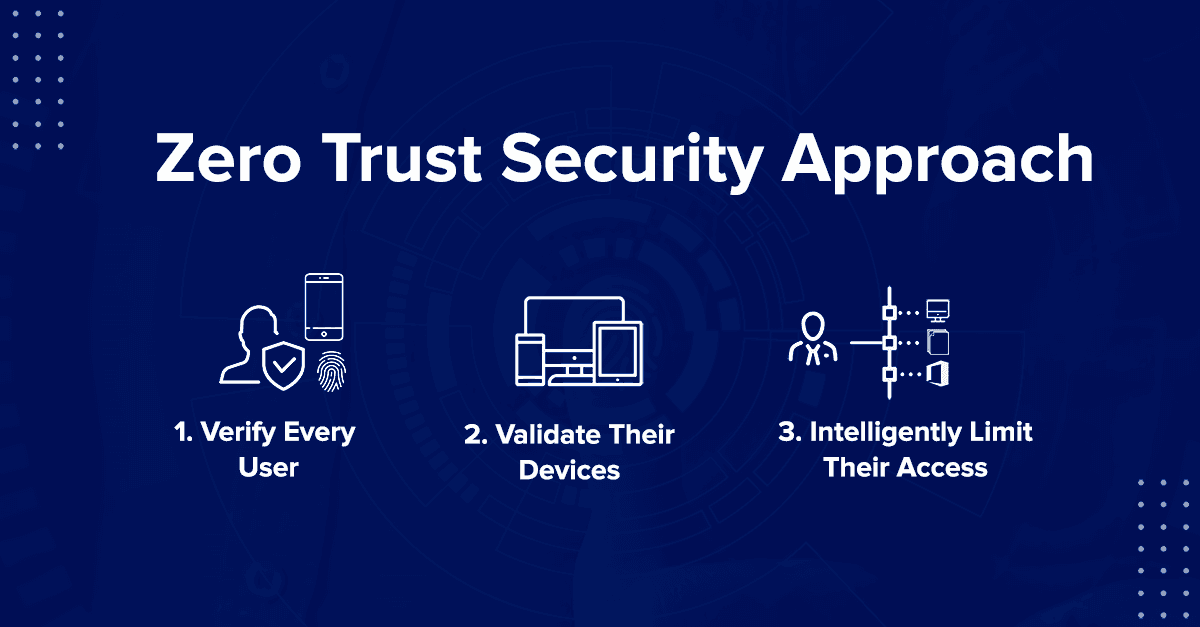
Zero Trust is a cybersecurity framework built on a simple, radical principle: Never trust, always verify. It assumes that no user, device, or network—whether inside or outside the organization—can be trusted by default. Every access request must be authenticated, authorized, and continuously validated.
In this guide, we'll break down what Zero Trust is, how it works, why it matters, and how you can start implementing it—without the intimidating jargon.
What Exactly is Zero Trust?
Let's start with a clear definition.
Zero Trust is a security model that eliminates the concept of a trusted internal network. Instead of assuming that users and devices inside the corporate firewall are safe, Zero Trust treats every access request as if it originates from an untrusted, open network.
The Core Principle: "Never Trust, Always Verify"
In practice, this means:
-
Verify explicitly: Authenticate and authorize every request based on all available data points (user identity, device health, location, data sensitivity, etc.).
-
Use least-privilege access: Grant users only the minimum access they need to do their job—and nothing more.
-
Assume breach: Operate as if an attacker is already inside your network. Segment access, monitor continuously, and be ready to respond.
The Problem with Traditional Security (The Castle-and-Moat)
To understand why Zero Trust is necessary, you need to understand what it replaced.
| Traditional Security ("Castle-and-Moat") | Zero Trust |
|---|---|
| Trust everything inside the network. | Trust nothing—inside or outside. |
| One-time authentication at the perimeter. | Continuous verification for every request. |
| Open internal access once you're "in." | Least-privilege access; segmented by need. |
| Assumes attackers are outside. | Assumes attackers are already inside. |
| Works well when everyone is in the office. | Designed for cloud, mobile, and remote work. |
Why the Castle-and-Moat Fails Today
-
Remote Work: Employees access corporate resources from home networks, coffee shops, and airports. The "perimeter" no longer exists.
-
Cloud Adoption: Data and applications are hosted outside the corporate network (AWS, Azure, SaaS apps). The moat is empty.
-
Advanced Threats: Attackers use phishing, stolen credentials, and social engineering to bypass the perimeter. Once inside, they move laterally—stealing data silently.
-
Insider Threats: Not all threats come from outside. Disgruntled employees or compromised accounts can do massive damage from the inside.
The Wake-Up Call: In 2020, the SolarWinds attack compromised thousands of organizations—including US government agencies. Attackers used legitimate credentials to move inside networks undetected for months. A Zero Trust approach would have stopped or severely limited the damage.
The 5 Pillars of Zero Trust
Zero Trust isn't a single product; it's a strategy. The National Institute of Standards and Technology (NIST) outlines five core pillars that form the foundation of a Zero Trust architecture.
1. Identity (Who are you?)
This is the most critical pillar. You must verify who is making the request.
-
How: Multi-Factor Authentication (MFA), Single Sign-On (SSO), and identity providers (like Okta, Azure AD).
-
Best Practice: Use phishing-resistant MFA (like biometrics or hardware keys). Passwords alone are not enough.
2. Devices (Is your device safe?)
Even if the user is legitimate, their device might be compromised.
-
How: Device health checks—is the OS updated? Is antivirus running? Is the device managed by the company?
-
Best Practice: Only allow access from devices that meet your security posture (using tools like CrowdStrike, Tanium, or Microsoft Intune).
3. Network (Where are you coming from?)
Not all locations are equal. A request from a known office IP is different from a request from a suspicious foreign country.
-
How: Network segmentation, micro-segmentation, and software-defined perimeters (SDP).
-
Best Practice: Segment your network into small zones so an attacker can't move freely (East-West traffic control).
4. Applications and Workloads (What are you accessing?)
Even if the user and device are trusted, should they access this specific application or data?
-
How: Granular access controls and application-layer policies.
-
Best Practice: Use API-based security and ensure apps are properly configured and patched.
5. Data (What are you trying to see?)
Ultimately, attackers want data. You must know where your sensitive data lives and who can access it.
-
How: Data classification, encryption (at rest and in transit), and Data Loss Prevention (DLP).
-
Best Practice: "Know your data." You can't protect what you don't know exists.
The Zero Trust Mindset: "Assume Breach"
Perhaps the most important shift Zero Trust requires is a psychological one: Assume that your network has already been breached.
This is not pessimism; it's preparedness.
-
Instead of asking, "Is this user inside the network?" you ask, "Is this user still safe to trust?"
-
Instead of building a single strong wall, you build many small barriers so that if an attacker breaks through one, they're stuck in a tiny, isolated room.
This is also known as "blast radius reduction." If a user's credentials are stolen, how much damage can the attacker actually do? If the user only has access to one specific application (and not the entire network), the damage is contained.
Zero Trust in Action: A Real-World Example
Let's imagine Sarah, a marketing manager at a mid-sized company.
Without Zero Trust (Traditional):
-
Sarah logs in with her username and password.
-
She enters the corporate network via VPN.
-
She can now access the CRM, the HR portal, the finance files, and the email server—because "she's inside the network."
-
A hacker steals her password. They log in and have full access to everything.
With Zero Trust:
-
Sarah logs in with her password and a biometric scan (MFA).
-
The system checks her device: Is it the company laptop? Is the antivirus up to date?
-
The system checks her location: She's logging in from a known office IP.
-
Based on this, she is granted access only to the marketing CRM—nothing else.
-
5 minutes later, the system re-evaluates her session. It sees she's trying to access the HR portal. Denied.
-
The hacker tries to log in from a different location using her credentials. MFA is required—denied.
Zero Trust vs. Traditional VPNs
Many companies believe that using a VPN means they're secure. But a VPN is simply an encrypted tunnel into the network. Once you're through the tunnel, you often have broad access—the exact opposite of Zero Trust.
| Feature | Traditional VPN | Zero Trust Network Access (ZTNA) |
|---|---|---|
| Access Model | Full network access once connected | Specific application access only |
| Visibility | User is "in" the network | User can only see allowed apps |
| Lateral Movement | High risk (attackers can pivot) | Low risk (segmented by app) |
| User Experience | Slower (all traffic routed through VPN) | Faster (direct-to-app connections) |
ZTNA (Zero Trust Network Access) is the modern replacement for VPNs. It creates an invisible, application-specific tunnel—the user never even sees the rest of the network.
Common Misconceptions About Zero Trust
1. "Zero Trust is a product I can buy."
No. It's a strategy. While there are Zero Trust tools (ZTNA, micro-segmentation, identity platforms), implementing Zero Trust requires a holistic cultural and architectural shift.
2. "Zero Trust means I don't trust my employees."
Not at all. It means you don't trust credentials blindly. It's about protecting the company from credential theft and compromised devices—not questioning employee integrity.
3. "Zero Trust is too complex for my small business."
It can be scaled. Even small businesses can implement MFA, enforce least-privilege access, and segment their network. Start with the basics.
How to Start Your Zero Trust Journey
Don't try to implement everything at once. Zero Trust is a journey, not a destination. Here's a practical roadmap:
Step 1: Start with Identity (MFA)
Action: Enforce Multi-Factor Authentication (MFA) for everyone—employees, contractors, and vendors.
Why: This single step stops over 99% of password-based attacks.
Step 2: Enforce Least-Privilege Access
Action: Audit user permissions. Remove access that people don't need. Implement "just-in-time" access (granting access only when needed).
Why: Reduces the blast radius of compromised accounts.
Step 3: Implement Device Health Checks
Action: Ensure only managed, healthy devices can access corporate resources. Use MDM (Mobile Device Management) tools.
Why: Prevents compromised personal devices from infecting your network.
Step 4: Segment Your Network
Action: Break your network into smaller zones. Control traffic between zones (East-West firewalls).
Why: Prevents lateral movement by attackers.
Step 5: Monitor and Continuously Validate
Action: Use SIEM (Security Information and Event Management) and UEBA (User and Entity Behavior Analytics) tools to detect anomalies.
Why: Assumes breach and detects it early.
The Future of Zero Trust
Zero Trust is no longer a buzzword—it's becoming mandatory.
-
US Government: Executive Order 14028 mandates Federal agencies to adopt Zero Trust architectures.
-
Insurance: Cyber insurance providers are increasingly requiring Zero Trust practices to qualify for coverage.
-
Compliance: Frameworks like NIST 800-207 and CISA's Zero Trust Maturity Model provide clear guidance.
The future of security is not a single wall. It's thousands of individual checkpoints, constantly asking: "Who are you? What do you need? Prove it."
Final Thoughts
Zero Trust is not about paranoia. It's about realism.
The old model of "trust but verify" is dead. In its place is the new mantra: "Never trust, always verify."
Implementing Zero Trust takes time, investment, and cultural change. But in a world where data breaches cost an average of $4.45 million (IBM, 2023), the cost of doing nothing is far higher.
Start small. Enforce MFA. Audit your access. Assume breach. And build a security posture that protects your organization—no matter where your users or data live.
Ready to take the next step? In our upcoming post, we'll walk through a practical guide to implementing Zero Trust with specific tools and frameworks. Subscribe to stay updated!
Quick Summary (TL;DR)
| What | Zero Trust is a security model that trusts no one—inside or outside the network. |
|---|---|
| Core Principle | "Never trust, always verify." Every request is authenticated and authorized. |
| Key Pillars | Identity, Devices, Network, Applications, Data. |
| Traditional vs. ZT | VPN = broad access; ZTNA = application-specific access. |
| First Step | Enforce Multi-Factor Authentication (MFA) everywhere. |
| Mindset | Assume breach. Reduce blast radius. Limit lateral movement. |
| Why Now | Remote work, cloud adoption, and advanced threats make the old perimeter obsolete. |
Contact Us
Phone: +91 9667708830
Email: info@codingnow.in
Website: https://codingnow.in/
Address:
2nd Floor, Kapil Vihar (Opp. Metro Pillar No.354)
Pitampura, New Delhi – 110034
Backlink to main website: Explore Python and AI courses at Coding Now – Gurukul of AI
