The Big Question
Let us ask you something directly.
You have built or used an AI application. You want it to do something useful—book a flight, check a database, send an email. But connecting your AI to the outside world is messy. Every service has a different API. Every tool has different documentation. You end up writing custom code for every single integration.
You think to yourself: "Is there a standard way to do this? Could we make connecting AI to tools as easy as plugging in a USB cable?"
This is exactly the problem MCP was designed to solve.
Here is the honest answer: Traditional APIs were built for human developers, not AI agents. An enterprise API can easily have 75-100 endpoints. Faced with too many choices, AI models slow down, struggle to differentiate between similar tools, and often pick the wrong one . MCP solves this by giving AI agents a standardized, discoverable interface to tools and data.
Let us understand how.
Step 3: What is MCP (Model Context Protocol)?
The Simple Definition:
The Model Context Protocol (MCP) is an open protocol that enables seamless integration between LLM applications and external data sources and tools . It standardizes how applications provide context to large language models (LLMs) .
What This Means in Plain Language:
| Analogy | What It Means |
|---|---|
| "USB-C for AI" | Just as USB-C provides a universal way to plug in peripherals, MCP provides a universal way to connect AI to tools and data |
| "Language Server Protocol for AI" | Just as LSP standardized how code editors talk to language tools, MCP standardizes how AI applications talk to external services |
| "Universal Adapter for AI" | MCP functions as a universal adapter, allowing AI models to access enterprise capabilities without custom integrations |
What MCP Enables:
| Capability | What It Means |
|---|---|
| Share Context | AI applications can access relevant information from external sources |
| Expose Tools | Systems can make their capabilities discoverable and usable by AI |
| Build Composable Workflows | Developers can combine different tools and services seamlessly |
Step 4: How Does MCP Work? (The Simple Version)
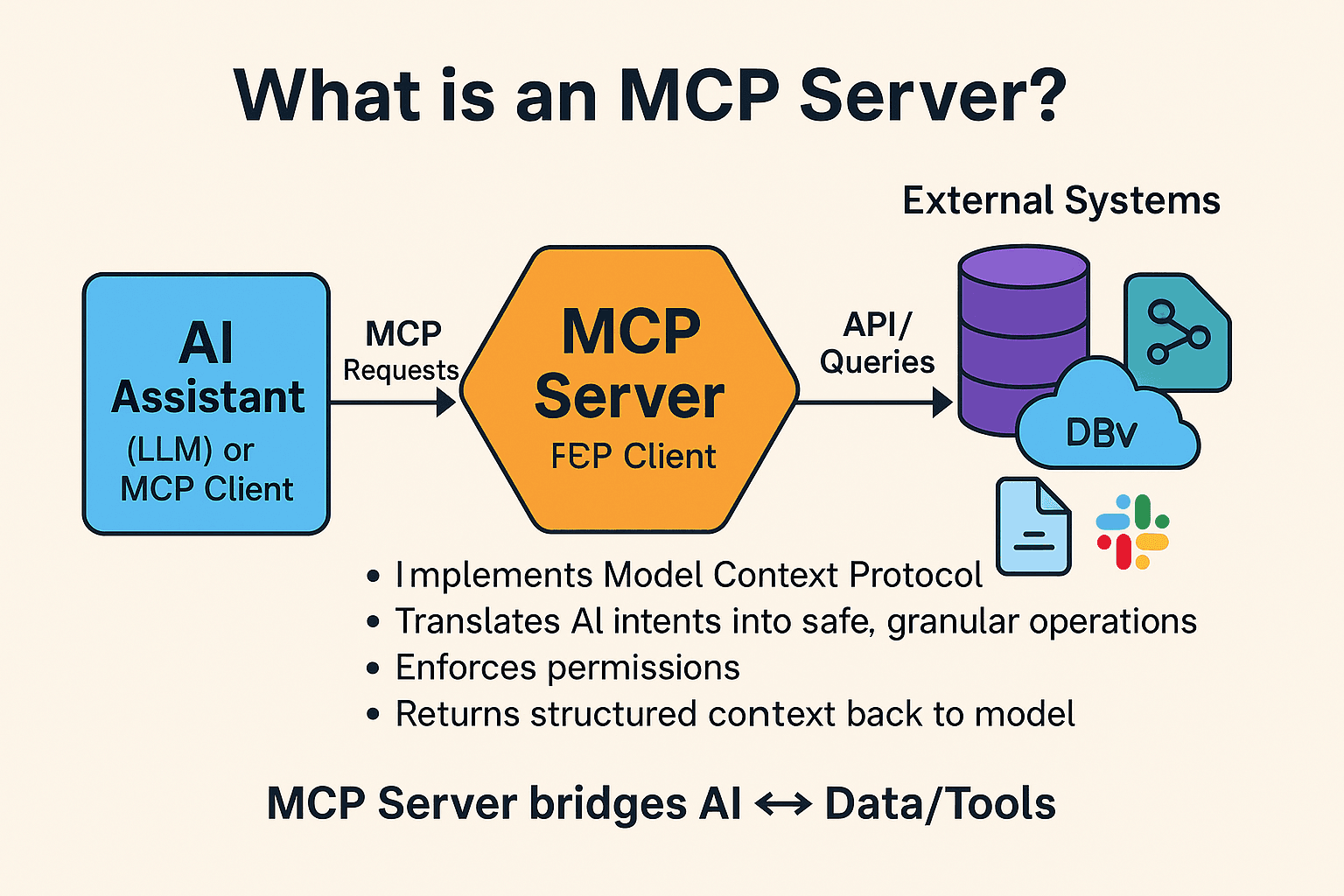
MCP uses a client-server architecture with three main parts :
The Architecture:
| Component | What It Is | Analogy |
|---|---|---|
| MCP Host | The AI application (like Claude Desktop or a chatbot) | The person using the tool |
| MCP Client | A component that connects to one MCP server | The adapter plug |
| MCP Server | A program that provides tools and data | The tool itself |
Think of It Like This:
The host is like a phone. The client is like the USB port. The server is like a keyboard you plug in. The phone doesn't need to know the keyboard's internal workings—it just follows the standard protocol. MCP does the same for AI.
The Three Primitives (What Servers Provide):
| Primitive | What It Does | Example |
|---|---|---|
| Tools | Executable functions an AI can invoke | "Get weather forecast," "Send email," "Search database" |
| Resources | Data sources the AI can read | File contents, database records, API responses |
| Prompts | Reusable templates for interacting with LLMs | System prompts, few-shot examples |
The Communication Method:
MCP uses JSON-RPC 2.0 messages over two types of transport :
-
STDIO: For local communication between processes on the same machine
-
Streamable HTTP: For remote server communication over the network
Step 5: Traditional APIs vs MCP – What Is the Difference?
This is where many people get confused. MCP does not replace APIs. It is a different layer designed for a different user.
The Key Distinction:
| Traditional API | MCP | |
|---|---|---|
| Primary User | Human developers | AI agents and LLMs |
| Interface Format | REST, GraphQL, SOAP | JSON-based tool schema |
| Discovery | Static; via documentation | Dynamic; runtime tool discovery |
| Invocation | HTTP requests to fixed URLs | JSON-RPC 2.0 messages |
| Integration Effort | Manual coding | Schema-driven automation |
The Problem with Traditional APIs for AI:
| Problem | What It Means |
|---|---|
| Choice Overload | An enterprise API can have 75-100 endpoints. LLMs are bad at choosing from too many options |
| Manual Translation | You need to write custom wrappers for every tool, describing its purpose, parameters, and outputs |
| No Discovery | The agent cannot ask the API "What can you do?" It only knows what you hard-coded |
How MCP Solves These Problems:
| Solution | What It Means |
|---|---|
| Abstracts Complexity | Instead of 100 low-level tools, give the AI a handful of high-level capabilities |
| Dynamic Discovery | The agent can connect and ask "What can you do?" at runtime |
| Standardized Communication | Reduces the need for custom wrappers for every service |
Step 6: MCP vs APIs – They Are Complementary, Not Competing
Here is the important takeaway: MCP and APIs are not in competition. They work together.
The Relationship:
| Layer | Role |
|---|---|
| APIs | Represent the system of record and process—core business logic and data |
| MCP | Represents the system of interaction—translates natural language into API calls |
When an AI Agent Takes Action:
| Step | What Happens |
|---|---|
| 1 | User asks: "Retrieve the customer's recent transactions" |
| 2 | MCP interprets the request and translates it |
| 3 | The API executes the request securely and accurately |
When to Use Which:
| Scenario | Recommended Approach |
|---|---|
| The capability must support multiple channels or systems | API-first |
| The logic or data exists behind an API | Expose via MCP |
| The function is experimental or AI-exclusive | MCP flow |
| The operation requires governance or auditability | API-first |
| Goal is rapid iteration for AI prototyping | MCP first, then formalize as API |
The Bottom Line:
Rather than viewing MCP and APIs as opposing strategies, it is more accurate to see them as mutually reinforcing layers in a modern integration framework . APIs remain the enterprise standard for scalable, governed integration. MCP provides the AI-friendly interface on top.
Step 7: Why MCP Matters – Security and User Consent
One of the most important aspects of MCP is its focus on security and user consent .
Key Security Principles:
| Principle | What It Means |
|---|---|
| User Consent and Control | Users must explicitly consent to and understand all data access and operations |
| Data Privacy | Hosts must obtain explicit user consent before exposing user data to servers |
| Tool Safety | Tools represent code execution and must be treated with caution |
| LLM Sampling Controls | Users must explicitly approve any LLM sampling requests |
Why This Matters:
As AI agents become more powerful, they will have access to more of your data and systems. MCP builds consent and authorization into the protocol itself, ensuring users retain control over what data is shared and what actions are taken .
Step 8: What Does MCP Mean for Your Career?
Understanding MCP is becoming increasingly important for AI developers and system architects.
Key Takeaways for Beginners:
| Learning Point | Why It Matters |
|---|---|
| MCP is not a replacement for APIs | It is a complementary layer for AI integration |
| MCP is designed for AI agents | It solves problems traditional APIs have with AI |
| MCP enables dynamic tool discovery | Agents can learn about tools at runtime |
| MCP is open and growing | Major companies are adopting it |
Prerequisites for Learning MCP:
| Requirement | Level |
|---|---|
| Basic programming knowledge | Essential |
| Understanding of client-server model | Recommended |
| Familiarity with REST and HTTP concepts | Recommended |
| Background in AI/ML concepts | Optional |
Step 9: Pro Tips for Beginners
Tip 1: Understand the Distinction
MCP is not just another API standard. It is designed specifically for AI agents, not human developers .
Tip 2: See It as a Complement
MCP and APIs work together. APIs provide the backend. MCP provides the AI-friendly interface .
Tip 3: Learn the Primitives
Tools, Resources, and Prompts are the core of MCP. Understand them before diving into implementation .
Tip 4: Start with Existing Resources
Check out the official MCP documentation for implementation guides and code examples .
Tip 5: Think in Terms of Capabilities
MCP abstracts complexity. Instead of 50 low-level tools, think about 5 high-level capabilities .
Step 10: Frequently Asked Questions
Q1: What is MCP in simple terms?
MCP is a standard way for AI models to connect to external tools and data. Think of it as "USB-C for AI." It provides a universal adapter for AI integration .
Q2: Will MCP replace APIs?
No. MCP enhances APIs. They are complementary layers—APIs provide the backend systems, and MCP provides the AI-friendly interface on top .
Q3: What is the difference between an API and MCP?
APIs are built for human developers. MCP is built for AI agents. MCP enables dynamic tool discovery and abstracts complexity for AI reasoning .
Q4: Is MCP difficult to learn?
If you have basic programming knowledge and understand client-server models, you can start learning MCP. The protocol is well-documented with examples in multiple languages .
Q5: Who created MCP?
MCP was initially created by Anthropic and is now maintained by the broader MCP community through the official GitHub organization .
Q6: Do I need to know AI to learn MCP?
Background in AI/ML is optional but helpful. The core of MCP is more about system integration and API design .
Step 11: Final Tagline
"MCP Is the Language Your AI Agent Speaks. Learn It and Build the Future."
Hashtags:
#MCP #ModelContextProtocol #AI #ArtificialIntelligence #LLM #AIIntegration #CodingNow #GurukulOfAI
Step 12: A Note on the Future of AI Integration
The Model Context Protocol represents a fundamental shift in how AI applications interact with the world. Just as the internet standardized communication between computers, MCP is standardizing communication between AI models and the tools they need to be useful.
As AI agents become more capable, the ability to connect them seamlessly to data sources and tools will become essential. Understanding MCP is not just a technical skill—it is a window into the future of how AI will work.
At Coding Now, we are committed to helping you build the skills that matter for the AI era. Come visit us. Take a free demo class. See what is possible.
Your AI integration journey starts now.
Contact Us
Phone: +91 9667708830
Email: info@codingnow.in
Website: https://codingnow.in/
Address:
2nd Floor, Kapil Vihar (Opp. Metro Pillar No.354)
Pitampura, New Delhi – 110034
Backlink to main website: Explore AI and integration courses at Coding Now – Gurukul of AI
