Async Programming in Python: A Quick Overview
What Is Async Programming?
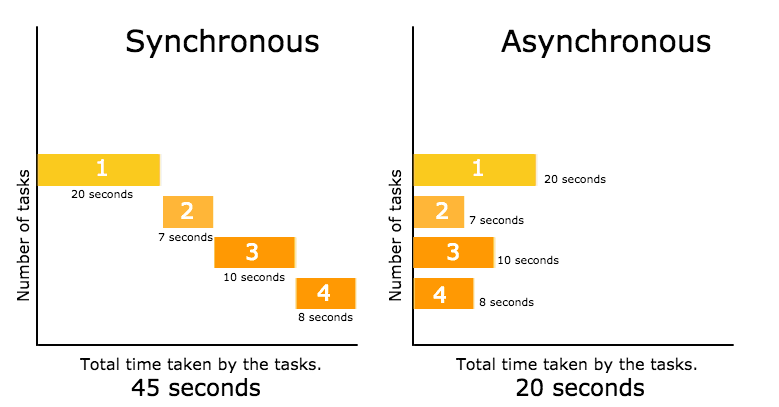
Async (asynchronous) programming in Python allows your code to handle multiple tasks simultaneously without blocking the execution of other operations. Instead of waiting for one task to finish before starting another, your program can continue working while waiting for I/O operations (like network requests, file reads, or database queries) to complete.
Why Use Async?
-
Improved performance: Handle many tasks concurrently
-
Better resource utilization: Don't waste time waiting
-
Faster response times: Especially for web applications and APIs
-
Efficient I/O handling: Perfect for network, database, and file operations
The Core Concepts
Async/Await Keywords
Async: Declares a function as asynchronous. These functions are called coroutines.
Await: Tells Python to pause execution until the awaited task completes, allowing other tasks to run in the meantime.
The Event Loop
The event loop is the engine that manages all asynchronous tasks. It continuously checks which tasks are ready to run, executes them, and handles waiting tasks efficiently.
Coroutines
Coroutines are specialized functions defined with async def. They can pause and resume their execution, making them perfect for non-blocking operations.
Tasks
Tasks wrap coroutines and schedule them to run on the event loop. They represent a unit of work that runs concurrently with others.
How It Differs From Multithreading
Async: Single-threaded, uses cooperative multitasking. Great for I/O-bound operations.
Multithreading: Multiple threads, uses preemptive multitasking. Better for CPU-bound operations.
Common Use Cases
-
Web applications: Handling multiple user requests simultaneously
-
API clients: Making multiple API calls concurrently
-
Web scraping: Fetching many web pages efficiently
-
Chat applications: Managing multiple connections
-
Database operations: Running queries without blocking
-
File processing: Reading/writing many files at once
Key Libraries
asyncio: Python's built-in async library with event loop and core utilities
aiohttp: Async HTTP client and server for web requests
aiofiles: Async file I/O operations
aiosqlite / asyncpg: Async database drivers
FastAPI: Popular web framework built on async
httpx: Modern async HTTP client
Best Practices
-
Don't mix sync and async: Avoid calling async functions from sync code without proper handling
-
Use asyncio.run(): The recommended way to run async code
-
Create tasks properly: Use
asyncio.create_task()for concurrent execution -
Handle exceptions: Use try/except blocks within async functions
-
Avoid blocking code: Use async versions of I/O operations
-
Use timeouts: Prevent hanging operations
-
Limit concurrency: Don't overwhelm resources with too many tasks
Common Pitfalls
-
Forgetting to await: Calling async functions without
awaitjust creates a coroutine object -
Blocking the event loop: Using synchronous I/O inside async functions
-
Creating too many tasks: Can overwhelm memory and performance
-
Mixing async libraries: Ensure libraries support async
-
Race conditions: Shared resources need proper synchronization
Getting Started
-
Start simple: Write basic async functions with asyncio
-
Use asyncio.gather(): Run multiple tasks concurrently
-
Add timeouts: Use
asyncio.wait_for() -
Experiment with web requests: Try aiohttp for practice
-
Build incrementally: Add async to existing code gradually
The Bottom Line
Async programming in Python unlocks significant performance gains for I/O-bound applications. While it introduces new concepts and complexity, the benefits of concurrency are worth the learning curve. Start with the fundamentals, practice with small projects, and you'll soon appreciate the power of non-blocking code.
Contact Us
Phone: +91 9667708830
Email: info@codingnow.in
Website: https://codingnow.in/
Address:
2nd Floor, Kapil Vihar (Opp. Metro Pillar No.354)
Pitampura, New Delhi – 110034
Backlink to main website: Explore Python and AI courses at Coding Now – Gurukul of AI
